
Apple Music offers millions of songs, albums, and playlists with high-quality audio streaming. However, Apple Music tracks are mainly designed to be played inside the Apple Music app. If you want to enjoy your favorite songs on more devices, create personal music backups, or play tracks on an MP3 player, converting Apple Music to MP3 is a practical solution.
In this guide, we will explain how to convert Apple Music to MP3 and introduce an easy tool — ViWizard Apple Music Converter — that helps you convert Apple Music songs, albums, and playlists into MP3 files while keeping high audio quality.
Why Convert Apple Music to MP3?
Apple Music is convenient for streaming, but there are some limitations. Downloaded Apple Music songs are usually stored in a protected format and can only be accessed through the Apple Music app. This means you cannot freely transfer them to an MP3 player, USB drive, or other unsupported devices.
By converting Apple Music to MP3, you can:
- Listen to Apple Music songs on any MP3-compatible device
- Keep a backup of your favorite playlists
- Play music without opening the Apple Music app
- Transfer songs to phones, tablets, USB drives, or car audio systems
- Manage your music collection more flexibly
MP3 is one of the most widely supported audio formats, making it a great choice for offline listening across different platforms.
Also Read: camerabewaking app
Can You Convert Apple Music to MP3 Directly?
Apple Music does not provide a direct option to export downloaded songs as MP3 files. While you can download music for offline listening with an Apple Music subscription, those downloads remain available only inside the Apple Music ecosystem.
To get Apple Music songs in MP3 format, you need a professional Apple Music converter. A dedicated converter can process Apple Music tracks and save them as common audio files such as MP3, WAV, FLAC, or M4A.
The Best Solution: ViWizard Apple Music Converter
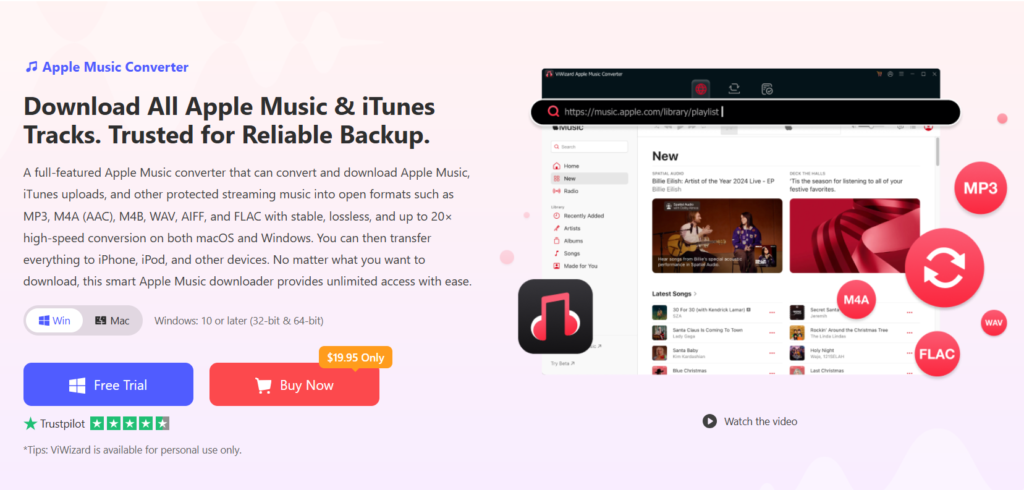
While Apple’s own Music app can convert unprotected files, it cannot bypass the DRM protection on Apple Music tracks. This is where ViWizard Apple Music Converter comes in. It is specifically designed to remove DRM and convert Apple Music to MP3, M4A, FLAC, WAV, and more.
Key Features That Make ViWizard Stand Out
Effortless DRM Removal: ViWizard strips DRM from Apple Music, iTunes purchases, and audiobooks, allowing you to convert them to open formats.
High-Quality MP3 Conversion: It can convert Apple Music to MP3 at up to 320 Kbps, preserving the richness and clarity of the original tracks.
Lossless & High-Resolution Support: For audiophiles, ViWizard also supports conversion to lossless formats like FLAC and WAV, maintaining the high-resolution quality of Apple Digital Masters.
Batch Conversion at 30× Speed: Using advanced multi-thread technology, ViWizard can convert entire playlists or albums at up to 30 times faster than real-time, saving you hours.
Preserves ID3 Tags: All metadata like title, artist, album, and cover art are retained in the output MP3 files, keeping your library organized.
Built-in Apple Music Web Player: You can access and select music directly from Apple’s catalog within the software interface.
How to Convert Apple Music to MP3 in 4 Simple Steps
Converting your music with ViWizard is a straightforward process.
Step 1: Log in to Your Apple Music Account
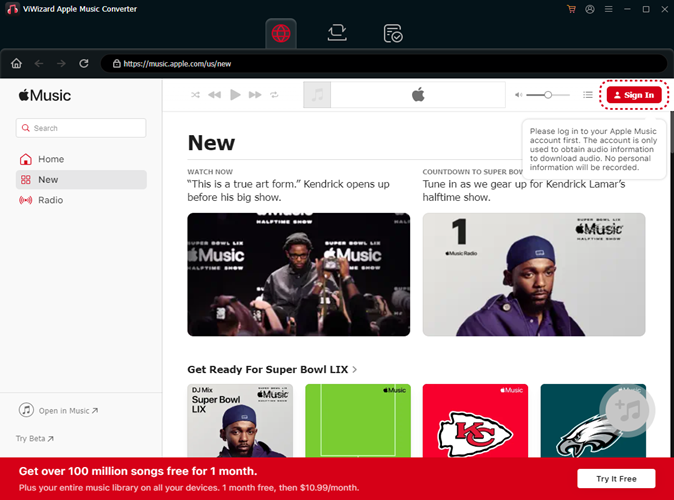
Download and install ViWizard Apple Music Converter. Open the software and sign in with your Apple ID with the built-in web player to access your library and the Apple Music catalog.
Step 2: Customize Output Settings
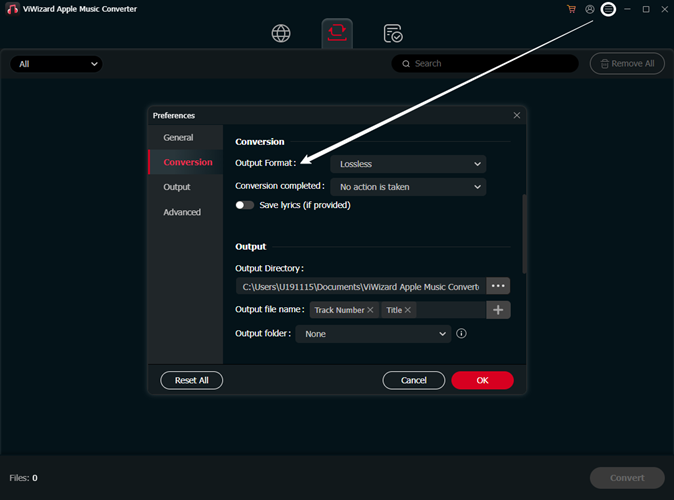
Click the menu icon (☰) and select “Preferences.” Go to the “Conversion” tab and choose MP3 as the output format. You can also adjust the bit rate (up to 320 Kbps) and other audio parameters for optimal quality.
Step 3: Select Music for Conversion
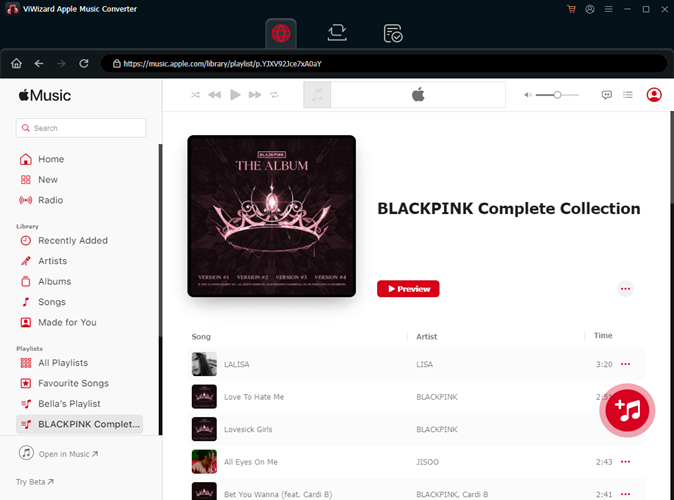
Browse your Apple Music library or use the built-in web player to find the songs, albums, or playlists you want to convert. Simply click the “+” button next to the tracks to add them to your conversion list.
Step 4: Download and Convert
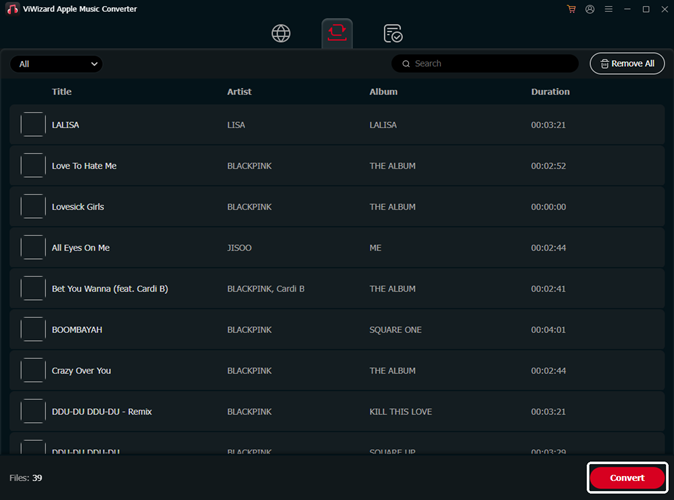
Click the “Convert” button. ViWizard will begin downloading and converting your selected Apple Music tracks to DRM-free MP3 files.
Also Read: brandrank.ai normalization transformation rules
Conclusion
If you want to truly own your Apple Music collection and listen to it anywhere, converting to MP3 is essential. ViWizard Apple Music Converter provides the most powerful, fast, and user-friendly solution to break free from DRM limitations. With its high-quality output, batch conversion speeds, and lifetime updates, it’s the ultimate tool for any Apple Music subscriber. Visit the official ViWizard website today to start converting your library to MP3 and enjoy your music on your own terms.