

For a product marketing team, the difficult part of video production is often keeping content current rather than producing the first version. Features change, training materials need updating, and campaigns require different creative assets for different audiences. Introducing an ai video generator into an existing production pipeline can make some of these tasks more manageable, provided the team understands which parts of the process can be automated and which still require reliable source material and human oversight.
The relevant question for an enterprise is not simply whether a model can produce an impressive video. It is whether the organisation can repeatedly produce acceptable footage within its deadlines, budget and quality requirements. That distinction changes how teams should evaluate tools and design their workflows.
Where Automated Video Fits Best in a Content Pipeline
Video generation is particularly useful when the desired output is illustrative rather than evidentiary. A conceptual animation explaining a data transfer, a background sequence for a feature announcement or a visual prototype for an upcoming campaign can be generated without having to document a specific physical event.
Visual prototyping is a natural entry point. Instead of committing to a production treatment based entirely on a written brief, a team can explore several visual directions and use short motion samples during creative review. These samples need not meet final delivery specifications; their purpose is to resolve creative decisions before more expensive work begins.
Product explainers require a more selective approach. Generated footage can establish the problem a product addresses or illustrate its broader application. However, a demonstration of a software interface should normally use an authentic screen recording. A generated interface might introduce nonexistent controls, incorrect labels or misleading interactions, undermining the accuracy of the explanation.
Internal training presents similar constraints. Illustrative sequences can provide context for a learning module, but instructions involving equipment, safety procedures or regulated activities should rely on validated material. A visually convincing reconstruction is not proof that a procedure has been performed correctly.
For localisation, separate visual assets from narration, captions and on-screen text. A language-neutral background clip can support several regional versions without being regenerated each time. Where the underlying message changes, local reviewers should check whether the visual context remains appropriate.
This division of responsibilities makes a hybrid pipeline more practical than an indiscriminate replacement of existing production methods. Authentic recordings establish factual accuracy; generated assets supply visual concepts, illustrative motion and supplementary footage.
Six Technical Criteria for Evaluating Video Generation Tools
A useful evaluation should resemble the team’s actual production workload. Select representative shots, establish acceptance criteria in advance and compare the outputs under comparable conditions. Include both straightforward and difficult tasks, rather than relying on a provider’s curated demonstration.
1. Temporal consistency
Temporal consistency describes how well visual properties remain stable across successive frames. A still frame can look convincing while the complete clip exhibits flickering textures, changing object geometry or inconsistent lighting. These defects are especially noticeable in footage featuring branded products, repeated patterns and rigid mechanical components.
Review clips at normal playback speed and then inspect problematic sections frame by frame. Pay attention to object boundaries, reflections, background structures and the appearance of any recurring subject. Record whether defects can be removed through trimming or require a completely new generation.
2. Motion and camera control
Subject movement and camera movement are separate variables. A stationary product filmed with a moving camera creates a different result from a rotating product filmed with a stationary camera. Evaluate whether the tool can follow each instruction independently and whether movement remains plausible throughout the clip.
Test a simple camera push, a lateral tracking movement and a locked-off composition. For a workflow that depends on matching existing footage, predictable framing may be more valuable than elaborate cinematic motion. Assess the availability of reference frames, motion controls and other relevant settings rather than assuming that prompt wording alone guarantees precise camera paths.
3. Image-to-video fidelity
When animating an approved product photograph, the critical question is how closely the generated footage preserves the reference. Check proportions, materials, colour, component placement and visible branding. A model may reinterpret details as it generates new viewpoints, particularly when the source image does not reveal the object’s other sides.
Define which changes are acceptable before testing. A subtle variation in background lighting may be harmless, whereas a changed connector position or missing button could make a product demonstration unusable. The acceptable tolerance depends on the intended role of the footage.
4. Resolution and duration
Output resolution determines the number of pixels available for editing and delivery, but it does not independently establish visual quality. A high-resolution clip can still contain unstable motion, inaccurate geometry or blurred details.
Evaluate the footage at its intended viewing size and after any necessary crop. Shorter clips can be easier to review and replace, while longer continuous shots may be valuable when the subject requires uninterrupted motion. Compare the supported durations, aspect ratios, frame rates and export options against actual delivery requirements.
5. Generation latency and throughput
Generation latency is the elapsed time between submitting a request and receiving an output. Throughput concerns how much usable material the team can produce over a given period. They are related but not interchangeable.
Record queue time, generation time and review time separately where possible. Consider concurrency limits, failed requests and peak-demand behaviour. A tool that generates quickly but frequently requires another attempt may deliver less useful footage than a slower alternative with more predictable results.
6. Cost per usable clip
The advertised price of one generation is an incomplete measure of production economics. A more useful metric divides the total cost of producing and reviewing a batch by the number of clips accepted for the intended purpose.
Cost per usable clip = (generation charges + review labour + corrective editing costs) / accepted clips.
Track acceptance rate separately by shot category. Abstract backgrounds may have a different acceptance rate from reference-based product shots. Combining them into one average can conceal the tasks responsible for most of the rework.
For hosted services, include subscription or credit expenditure and relevant storage or export charges. For self-hosted systems, account for accelerator time, infrastructure utilisation and maintenance. The goal is a comparable measure of delivered value, not simply a comparison of model inference prices.
Building a Hybrid AI Video Production Workflow
Start with a content brief that defines the audience, factual message, distribution channel and approval requirements. Break the script into shots and assign each shot a production method. A useful shot record includes its narrative purpose, source assets, expected duration, framing, accuracy requirements and responsible reviewer.
Classify footage as factual, illustrative or transitional. Factual shots require verified source material. Illustrative shots can use generated scenes if their role is clear. Transitional shots, such as abstract motion backgrounds, often allow greater creative freedom.
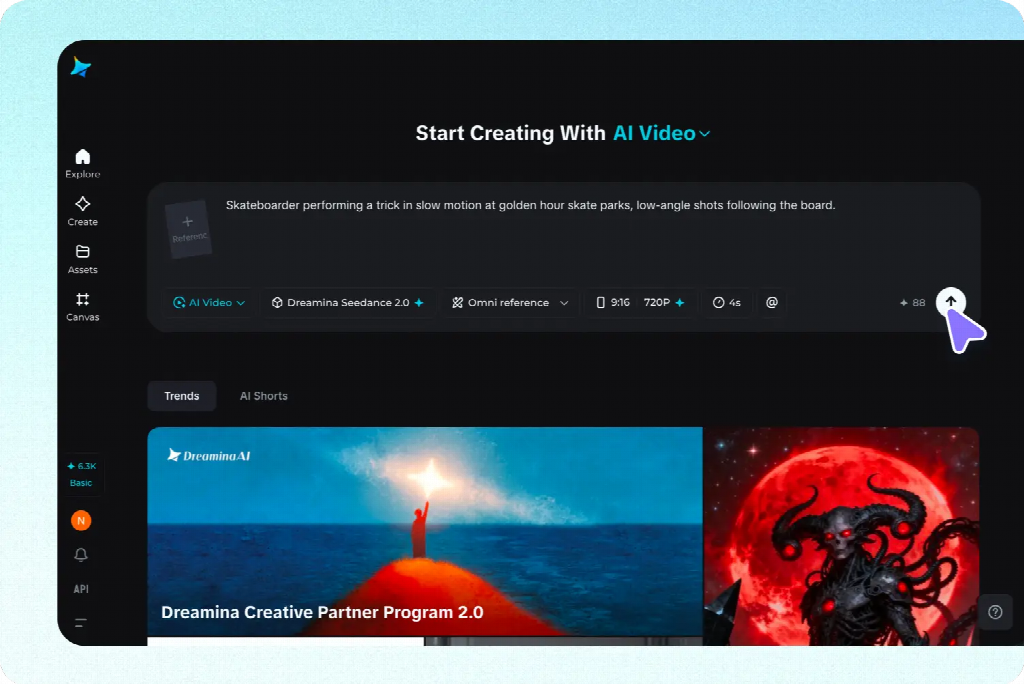
At the generation stage, an online tool such as Dreamina can help translate text descriptions or suitable reference images into motion concepts. Keep generated footage modular so that individual clips can be replaced without rebuilding an entire sequence. Check the available model settings and output options against the shot specification before committing to a batch.
Establish a review gate before footage enters the editing timeline. Reviewers should check visual stability, factual accuracy where applicable, brand suitability and whether the shot fulfils its narrative purpose. Rejecting an unsuitable asset early avoids spending additional time on colour correction, sound design or compositing.
The editing stage combines approved generated footage with authentic recordings, graphics, narration and captions. Maintain editable project files rather than embedding all information into generated clips. When a product feature changes, the team can replace the relevant screen recording or text layer without regenerating unrelated visual material.
Finally, route the assembled video through the appropriate content owner and brand or compliance reviewers. Define who can approve illustrative material and who must verify product claims. For confidential reference assets, check the service’s data retention, access controls and usage terms before uploading anything.
Balancing Quality, Speed and Production Costs
A production team does not need the highest available resolution for every creative decision. Where the service supports different quality settings, use economical previews to assess composition and broad motion. Reserve final-quality generation for shots whose creative direction has been approved. Keep in mind that a higher-quality regeneration may differ from its preview, so it still requires review.
Avoid generating a long sequence when only one portion needs to change. Short, independently managed shots limit the scope of revisions and make it easier to combine generated footage with conventional assets. However, excessively fragmenting a sequence can create continuity problems. Choose shot boundaries that correspond to meaningful changes in the visual narrative.
Set a retry policy. If several attempts fail to preserve a critical product detail, change the production method rather than continuing to spend credits on the same problem. A controlled animation of an approved photograph or a conventional recording may be a more reliable alternative.
Maintain an asset register containing the approved reference, prompt, model or version where available, generation settings, output file and approval status. This helps teams identify reusable material and investigate quality differences when tools change. Do not assume that recording a prompt guarantees identical future output.
During a pilot, measure the time from approved brief to accepted footage, the proportion of usable outputs and the editing effort required. Compare these results with the existing production process for equivalent deliverables. This establishes whether automation reduces a real bottleneck or merely shifts work from filming to reviewing and correction.
Motion Prompting and Post-Production Practices
Write motion instructions as a shot specification rather than a collection of stylistic adjectives. Identify the subject, its permitted movement, the camera path, the environment and the details that must remain stable. For instance, an illustrative technology shot might specify a stationary unbranded device on a matte surface, a slow lateral camera movement, stable geometry, soft directional lighting and no added lettering.
Change one major motion variable at a time when diagnosing an unsatisfactory output. If the camera path and subject movement both change between attempts, it becomes difficult to identify which instruction contributed to the problem. Where a tool exposes explicit controls, use them alongside the prompt rather than relying entirely on descriptive language.
In post-production, standardise frame rates and colour treatment before combining clips. Upscaling can improve delivery dimensions, but it cannot reliably recover factual details that were never generated correctly. Frame interpolation can also introduce artifacts around moving edges, so inspect processed footage before approval.
Keep narration, music and effects on separate audio tracks. Match the mix to the intended distribution channel, prioritise speech intelligibility and check playback on ordinary speakers. Add verified text, diagrams and logos as editable overlays instead of asking the video model to reproduce exact typography.
The final review should cover the exported file, not just the individual source clips. Check transitions, caption timing, compression artifacts, audio synchronisation and the accuracy of any product claims. Follow applicable disclosure requirements for synthetic content and retain the relevant permissions for reference assets and audio.
Treat Automation as a Production Capability
The strongest case for automated video generation is a repeatable process that produces appropriate assets with manageable review effort. Begin with a narrow set of illustrative tasks, establish acceptance criteria and measure the complete production cost before expanding the workflow.
By preserving authentic material where accuracy matters and applying generation where visual flexibility is valuable, teams can make better use of their production resources without sacrificing the reliability of their content.