


Software testing is the process of verifying that an application behaves the way it’s supposed to before real users ever touch it. That’s the entire job in one sentence. Everything else — test levels, frameworks, CI/CD pipelines, bug trackers — exists to make that one sentence true at scale, under deadline pressure, across a codebase that changes every day.
I’ve led QA teams for over twelve years, across startups shipping weekly and enterprise shops running quarterly release trains. In that time I’ve seen the same pattern play out constantly: teams that treat testing as a checkbox after development ship more bugs than teams that treat it as a parallel discipline from day one. This guide covers the fundamentals — the definitions you’ll find anywhere — but I’m also going to walk through where those fundamentals fall apart in production, because that’s the part most beginner guides skip.
Why Testing Basics Actually Matter (Beyond the Textbook Answer)
Here’s a number that should be on a sticky note at every junior developer’s desk: fixing a bug in production can cost up to 30 times more than catching it during development. That multiplier isn’t scare-tactic marketing — it comes from the compounding cost of a defect as it moves downstream. A bug caught while you’re writing the code costs you a few minutes. The same bug caught in staging costs a QA cycle. The same bug caught in production costs an incident response, a hotfix deploy, a client apology, and sometimes a refund.
Pro-Tip: If you only remember one thing from this article, remember that testing is cheapest the earlier it happens. Every stage a defect survives multiplies the cost of catching it.
The Four Core Levels of Software Testing
Every QA curriculum starts here, and for good reason — you can’t have an intelligent conversation about test strategy without knowing where each type of test lives in the pipeline. Here’s how I’d explain it to a new hire on day one:
| Test Level | What It Checks | Who Usually Writes It | When It Runs |
|---|---|---|---|
| Unit Testing | A single function, method, or component in isolation | The developer who wrote the code | On every commit, inside the CI/CD pipeline |
| Integration Testing | Whether separate modules or services work together correctly (e.g., API to database) | Developers or QA engineers | After a pull request merges, pre-staging |
| System Testing | The application as a whole, end-to-end, against functional requirements | QA engineers | In the staging environment, before release sign-off |
| User Acceptance Testing (UAT) | Whether the product actually solves the business problem for real users | Product owners, stakeholders, or client teams | Final gate before production release |
Notice the direction that table moves: from narrow and technical (unit) to broad and business-focused (UAT). A healthy test strategy has coverage at every level — teams that only invest in unit tests and skip system-level checks are the ones who get blindsided by bugs that only appear when everything runs together.
Functional and Regression Testing: Where Your Day Actually Goes
Test levels are the theory. In day-to-day QA work, most of your time isn’t spent categorizing tests — it’s spent running them. Functional and regression tests make up over 60% of daily QA workflows on most teams I’ve managed. Functional testing confirms a feature works as specified. Regression testing confirms that a new change didn’t quietly break something that used to work.
Regression testing is the one junior engineers underestimate the most. It feels repetitive — you’re re-running checks on features that already passed once. But regression suites are what catch the “we fixed the checkout bug and broke the login page” scenario, which happens more often than anyone likes to admit in a fast-moving codebase.
Also Read: Recovery Home Management Software Solutions: The 2026 Buyer’s Guide
Automation vs. Manual Testing: My Honest Take
Automation gets pitched as the endgame of QA maturity, and in a lot of marketing content it’s presented like it replaces manual work entirely. It doesn’t, and it never will. Automation supplements manual exploratory testing — it does not replace it.
Here’s the distinction I give new QA hires:
- Automate the predictable: regression suites, smoke tests, and any flow you’ll re-run dozens of times as the codebase evolves.
- Keep humans on the unpredictable: exploratory testing, usability judgment calls, and edge cases nobody thought to write a script for.
- Never trust a green build blindly: automated suites can pass while missing an entire category of real-world failure, especially anything tied to actual browser rendering or third-party integrations.
Warning — the “false green” trap: A passing automated suite tells you your known checks still work. It tells you nothing about what you didn’t think to check. Flaky tests that get silently retried until they pass are just as dangerous — they train your team to stop trusting the results.
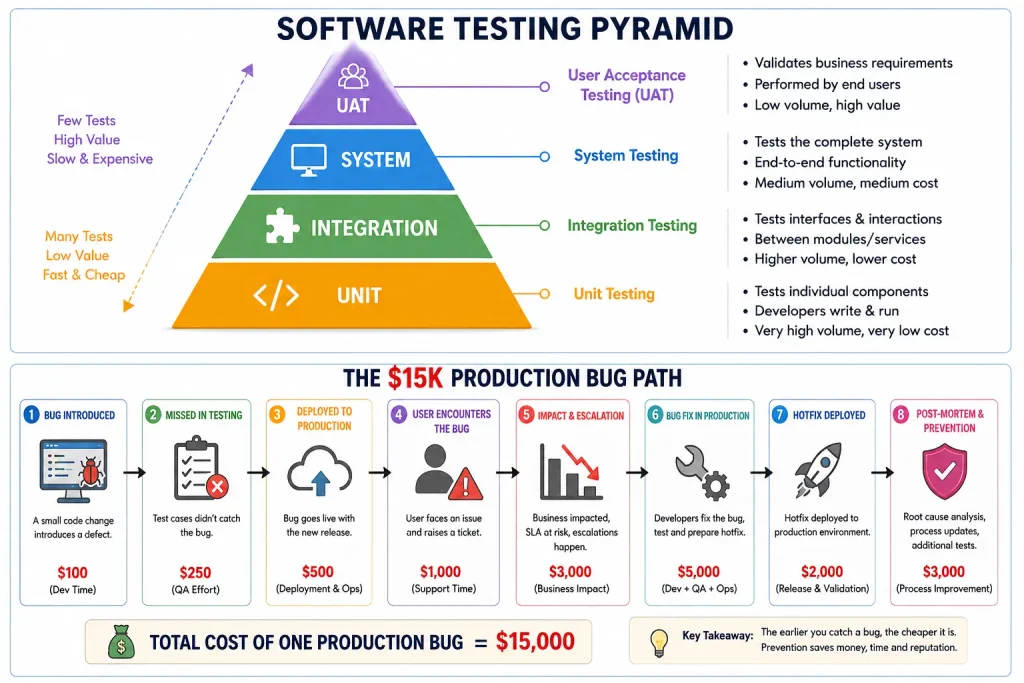
A Case Study: How One Skipped Step Cost $15K in a Weekend
Early in my career as a QA lead, my team shipped a payment gateway update. It passed every unit test. Code review looked clean. The build was green across the board, so we approved the production release.
What we didn’t do was run an end-to-end regression test on real browser sessions — we’d relied on unit and integration coverage and assumed that was enough for a routine update. It wasn’t. A session-handling edge case that only surfaced in an actual browser environment caused transactions to fail intermittently in production. It happened over a weekend, when on-call coverage was thin and the issue took hours to fully diagnose. By the time we rolled back, the client had lost roughly $15,000 in halted transactions.
Nobody on that team was careless. We had tests. We had a CI/CD pipeline. What we didn’t have was a step that validated real user behavior in a real browser, at the system level, before the code touched production. That gap is exactly what system testing exists to close, and it’s why I’ve never approved a payment-path or checkout-path release since without one.
The Vanity Metric I’d Ban If I Could: 100% Code Coverage
This is where I’ll disagree with a lot of QA content you’ll find elsewhere. Code coverage percentage tells you whether a line of code executed during a test. It does not tell you whether that test actually verified correct behavior. You can hit 100% coverage with tests that call a function and assert nothing meaningful — and plenty of teams under deadline pressure do exactly that.
100% code coverage is a dangerous vanity metric. Chasing it encourages engineers to write tests that satisfy a number instead of tests that protect the business. I’d rather see a team at 70% coverage that has thoroughly tested every high-risk path — payments, auth, data writes — than a team at 100% that spread its effort evenly across low-risk and high-risk code alike.
How I Prioritize Test Coverage on Real Teams
- Map the user paths that touch money, data integrity, or security first. These are non-negotiable coverage targets regardless of how “simple” the code looks.
- Rank remaining features by usage frequency. The feature every user touches daily deserves more scrutiny than the settings page three people have opened this year.
- Treat coverage percentage as a diagnostic, not a target. A sudden coverage drop tells you where to look. It’s a smoke detector, not a finish line.
- Budget time for exploratory testing on every release, even a small one. This is where testers find the bugs nobody wrote a test case for because nobody anticipated them.
Getting Started: What to Actually Do This Week
If you’re a junior developer or an aspiring QA engineer trying to build real fundamentals rather than just pass an interview question, here’s where I’d point your first week of practice:
- Write unit tests for the riskiest function in your current project, not the easiest one. Risk-first thinking is a habit worth building early.
- Read your team’s existing regression suite end to end. You’ll learn more about what the product actually does from the test suite than from most documentation.
- Sit in on one full UAT session if your team runs them. Watching a non-technical stakeholder use the product exposes gaps that pure functional testing never will.
- Ask “what happens if this fails?” for every pull request you review, not just “does this work.” That question is the entire mindset shift from writing code to testing code.
Also Read: Sheppard software guide
Frequently Asked Questions
What are the basics in testing every junior developer should know?
The basics in testing come down to four levels — unit, integration, system, and user acceptance testing — plus knowing when to automate a check versus when to explore the app manually. Start by writing meaningful unit tests for high-risk logic rather than chasing full coverage.
Is 100% code coverage a good testing goal?
No. It measures execution, not verification. Teams chasing full coverage often write shallow tests that create false confidence rather than catching real bugs.
Can test automation fully replace manual testing?
No. Automation handles repeatable, known checks well, but exploratory testing by a human still catches the edge cases and usability issues that no script was written to look for.















[…] Also Read: Basics in Testing: A QA Lead’s No-Nonsense Guide to Software Testing Fundamentals […]
[…] Also Read: Basics in Testing: A QA Lead’s No-Nonsense Guide to Software Testing Fundamentals […]